Showing posts with label Random stuff. Show all posts

Tuesday, 27 July 2010

Ubuntu self support

A very large part of my friends which I have convinced to move to Ubuntu evidently ask me several questions whenever something bad happens to their OS. I sometimes know what to do, but most of the time I know where to search for the answer, just as they know how to google for errors when they are in Windows, however this process seems to be forgotten when any new OS, phone, car, TV or general device is taken into account. While I am not really bothered by these questions (as i generally like to help, and they don't come very often), I feel the need to make a list of really good places to get help.

Websites

  • Google of course, I should not have to mention this, but people seem to forget.
  • Ubuntuforums if the question hasn't been asked here, than you're probably the first to experience the problem
  • Ubuntuguide this is an amazing wiki with short guides for installing Ubuntu and a large array of common applications. Common applications range from some games, ebook readers, text editors, web browsers, IM clients to server applications, virtual machines, software development tools, web publishing and many others. It's mostly composed of links to the original program instalation guide, but it also has instructions for several of the apps described there. Great place to start when looking for something new.
  • help.ubuntu.com is another large help database, but I've only used it when google links directed me here.
Local support
  • Manuals. I mean really RTFM!!! Want to know how to copy folders? man cp... se what that -r does... it's not that hard people, well made manuals are the source of happiness, even 200 page ones. I'm not telling you to waste your time reading 200 page manuals, but they have a Table of Contents for goodness sake when they are that big. And usually come in HTML or RTF or some smart format when they are that big.
  • Help / F1, same as manuals, sometimes that is the manual.

Live support
  • IRC. People think it's outdated or something, but IRC's are still one of the best communicating tools out there. Freenode.net is probably the best server out there for computer related help ( irc.freenode.net/7000 ). There are channels for loads of common programs and OSes, but right now we are obviously interested in #ubuntu. For my Romanian pals out there, there's also #ubuntu-ro.
  • Ask the forums. Even if you find a solution before someone answers, it might help someone else with the same problem.
  • Ask people you know. You should do this after searching websites, local help and IRC's, because those places are dedicated to help you and the friend you're looking for might not be there.
What to do when all things fail?
  • Well, there's a saying out there in IT support: "Have you tried turning it off and on again?". Like I mean it.
I hope someone finds this useful (especially the links up there) and most of it can be applied to a very large variety of problems. Like XKCD said, we don't know everything... this is what we usually do.
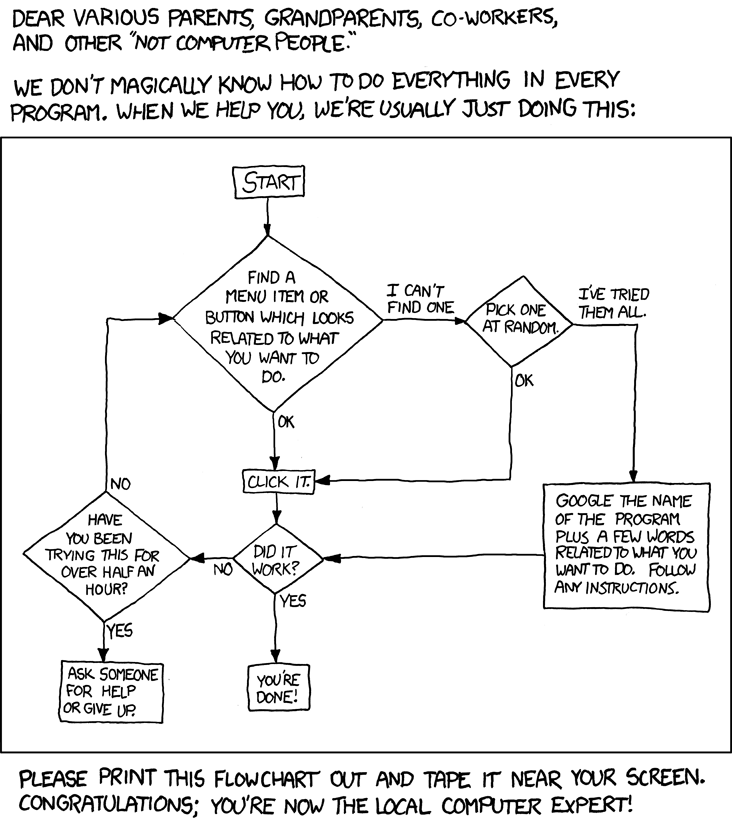
Enjoy, everyone.

Monday, 28 December 2009

Hello World! + Killing yahoo messengers

Hello Everyone!


I decided today I wanted to make a blog, so here we are.
I don't really know what to start with, so I'll show you a nice little trick to make idiots close their own Yahoo Messenger. (Because I just hate Y!Msg).


So... before we get to business, you probably didn't know that yahoo messenger has some "browser" commands... just like the mailto:someEmail command. These commands are after all links... so you don't need to be in a browser to use them.... you can use them as links in your status.


If you see this in a website for example:

<a href="ymsgr:sendim?notarealuser">Send Message</a>


there will be a link that opens a yahoo messenger window chatting with notarealuser.


There are other similar commands (this list is taken from wikipedia):

* ymsgr:addfriend? Example: ymsgr:addfriend?myid
* ymsgr:sendfile? Example: ymsgr:sendfile?myid
* ymsgr:call? Example: ymsgr:call?1-800-555-7654
* ymsgr:callPhone? Example: ymsgr:callPhone?1-800-555-7654
* YMSGR:chat? "opens chat room list"
* ymsgr:im? Opens "send an im window"
* ymsgr:getimv?doodle
* ymsgr:getimv?yfighter


There is one command though that does not appear in the list because it's not "useful":


ymsgr:-kill


That is what you should add at the end of your status (or at the link box or whatever is now in the latest version of the messenger). The only thing you have to make sure is that you have no other links before that.


As far as I know (though I'm not sure...) Y!Msg 8 and older are immune, but still it's a nice trick : D.


Have a Nice day everyone,
Laserbeam - out.